Best Free Billing Software in India: Elite Billing vs Zoho Books, Khata Billing and GoGSTBill
For Indian businesses that need unlimited invoices, stock management and up to five employee accounts without a yearly software fee, Elite Billing is one of the strongest free billing software choices. Zoho Books can be the better fit when accounting depth is the priority. Khata Billing suits a smaller billing counter that can work within its free invoice allowance, while GoGSTBill offers a useful free plan with mobile access and support but a yearly document limit.
There is no single winner for every business. The best free billing software in India is the one whose free-plan limits match your actual sales volume, team size and workflow. This guide compares the published free plans of Elite Billing, Zoho Books, Khata Billing and GoGSTBill so you can choose on facts instead of a “free” headline.
Start Using Elite Billing for Free
Create unlimited invoices, manage stock and give access to up to five employee accounts.
Which free billing software should you choose?
- Choose Elite Billing if invoice volume, five employee accounts and connected billing-plus-inventory workflows matter more than live support on the free plan.
- Choose Zoho Books if you want a broader accounting platform and your business remains within its free-plan revenue and invoice eligibility limits.
- Choose Khata Billing if you run a modest-volume retail counter and value its free POS, stock and barcode-based billing workflow.
- Choose GoGSTBill if its 3,000-document yearly allowance and 25-items-per-document limit suit your business and you value free phone and email support.
If you are unsure which requirements matter, first read our practical guide on how to choose billing software for an Indian small business.
How we reviewed these four free billing plans
We checked the public pricing and plan-comparison information published by each company on October 20, 2026. The review focuses on the free-plan details that can change day-to-day operations: invoice or document allowances, revenue eligibility, team access, inventory, barcode workflows, support and the point at which an upgrade may be required.
Elite Billing’s features were also checked against the current application workflows and pricing information, including products, stock, barcode entry, quotations and sales invoices. Editorial disclosure: this comparison is published by Elite Billing. To keep it useful, it identifies competitors’ strengths, states Elite Billing’s free-plan limitation, and avoids claiming a feature when the reviewed pricing information does not clearly document it.
Tired of free-plan limits? Compare what each free billing plan includes
The details below were checked against each company’s published pricing information on October 20, 2026. Plans can change, so recheck the current plan before moving business data or buying add-ons.
| Free-plan detail | Elite Billing | Zoho Books India | Khata Billing | GoGSTBill |
|---|---|---|---|---|
| Plan price | ₹0; no yearly software fee | Free while eligible | Free forever | Free lifetime |
| Invoice or document allowance | Unlimited invoices | Up to 1,000 invoices per year | Up to 10 GST invoices per day and 100 in 30 days | Up to 3,000 documents per year |
| Revenue eligibility | No revenue eligibility limit listed | Annual revenue up to ₹25 lakh | No revenue eligibility limit listed | No revenue eligibility limit listed |
| Team or counter access | Up to 5 employee accounts | 1 user plus 1 accountant | Up to 2 POS screens listed | Staff accounts are listed with Premium |
| Inventory | Inventory, purchases and expenses included | Item management and inventory tracking included; advanced inventory tools are on higher plans | Stock, parties and basic reports included | Basic inventory included; advanced inventory is Premium |
| Barcode workflow | Barcode product entry supported | Barcode generation and scanning are listed on higher plans | Barcode-based invoice creation included | Barcode is listed with Premium |
| Free-plan assistance | Self-setup; no live support | Email support listed | Priority customer support listed | Phone and email support listed |
| Important extra limit | No invoice cap listed | Revenue threshold applies | Daily and rolling 30-day invoice caps apply | Maximum 25 items per document |
“No revenue eligibility limit listed” means the reviewed public pricing page did not state one; it is not a promise that terms can never change. Product names and trademarks belong to their respective owners.
Why Elite Billing stands out among free billing software
1. Unlimited invoices remove the first growth barrier
A billing limit feels unimportant when a shop creates only a few invoices. It becomes an operational problem when sales increase during weekends, festivals or seasonal demand. Stopping at a daily or annual allowance can mean postponing bills, moving to another tool or paying for an upgrade at the busiest time.
Elite Billing’s free plan lists unlimited invoices. This is its clearest advantage over the other free plans in this comparison. A grocery shop, boutique, mobile shop, wholesaler or service counter can continue creating bills without counting how many free documents remain. See the real workflow in our step-by-step Elite Billing sales invoice guide.
2. Five employee accounts are included at ₹0
Small businesses are rarely managed by only one person. An owner may need a cashier to create bills, a store employee to maintain products and another team member to follow up on customers. Elite Billing Plan 1 allows up to five employee accounts, giving a growing shop room to involve its team without immediately paying for a larger plan.
This is not the same as saying every free product should offer five users. Zoho Books pairs one standard user with one accountant, Khata Billing lists two POS screens, and GoGSTBill reserves staff accounts for Premium. Those structures can still work well for solo owners or single-counter businesses; Elite Billing is more flexible when several employees need access.
3. Billing and stock work together
Free invoicing alone is not enough for a product business. You also need to know what was purchased, what was sold and which items need attention. Elite Billing connects products, purchase invoices, sales invoices, stock adjustments, customers, suppliers and expenses in the same workspace.
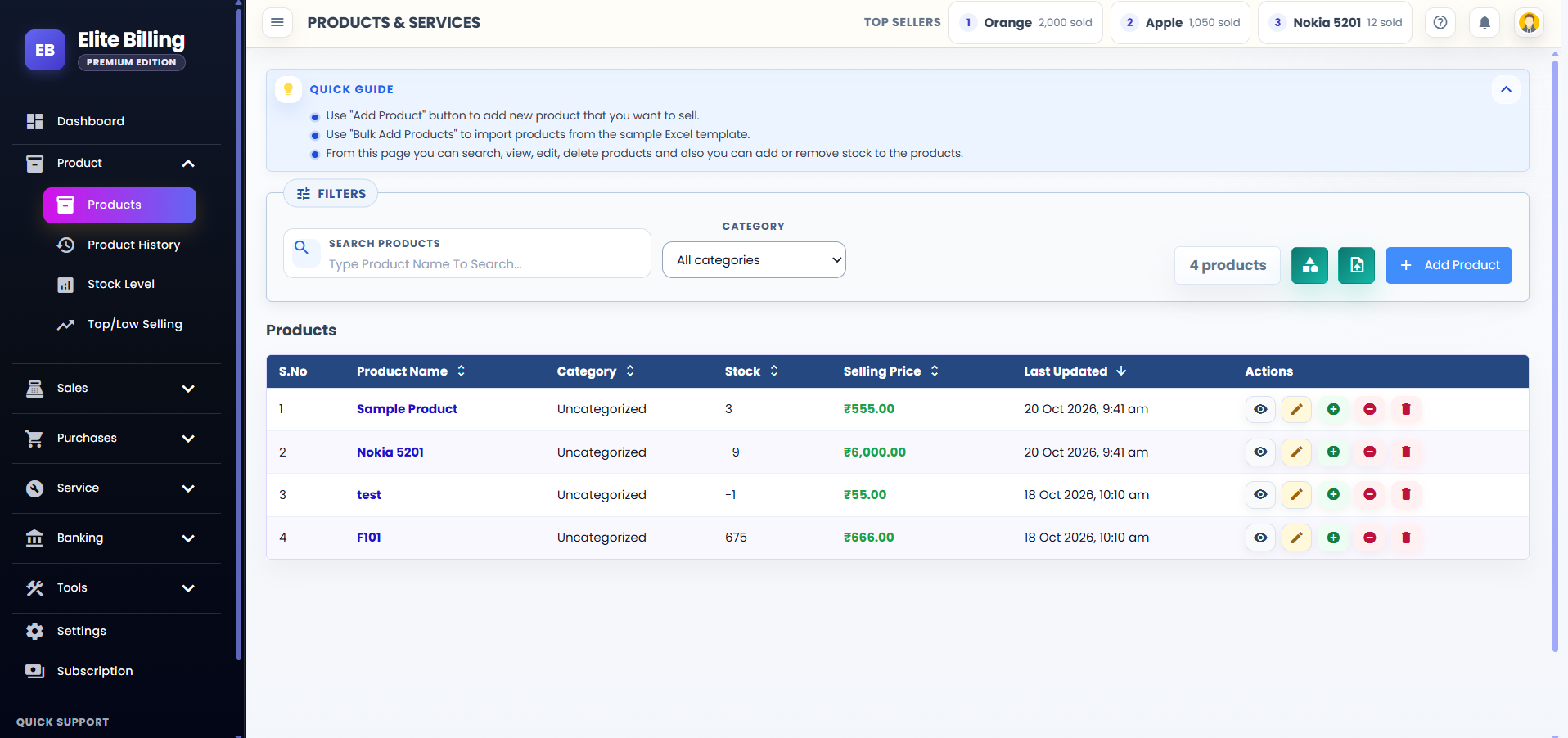
You can add opening stock while creating a product, record later stock changes and use the saved product during billing. Our guides explain how to add products and opening stock and how billing software with stock management helps prevent separate, inconsistent records.
4. Barcode entry supports faster counters
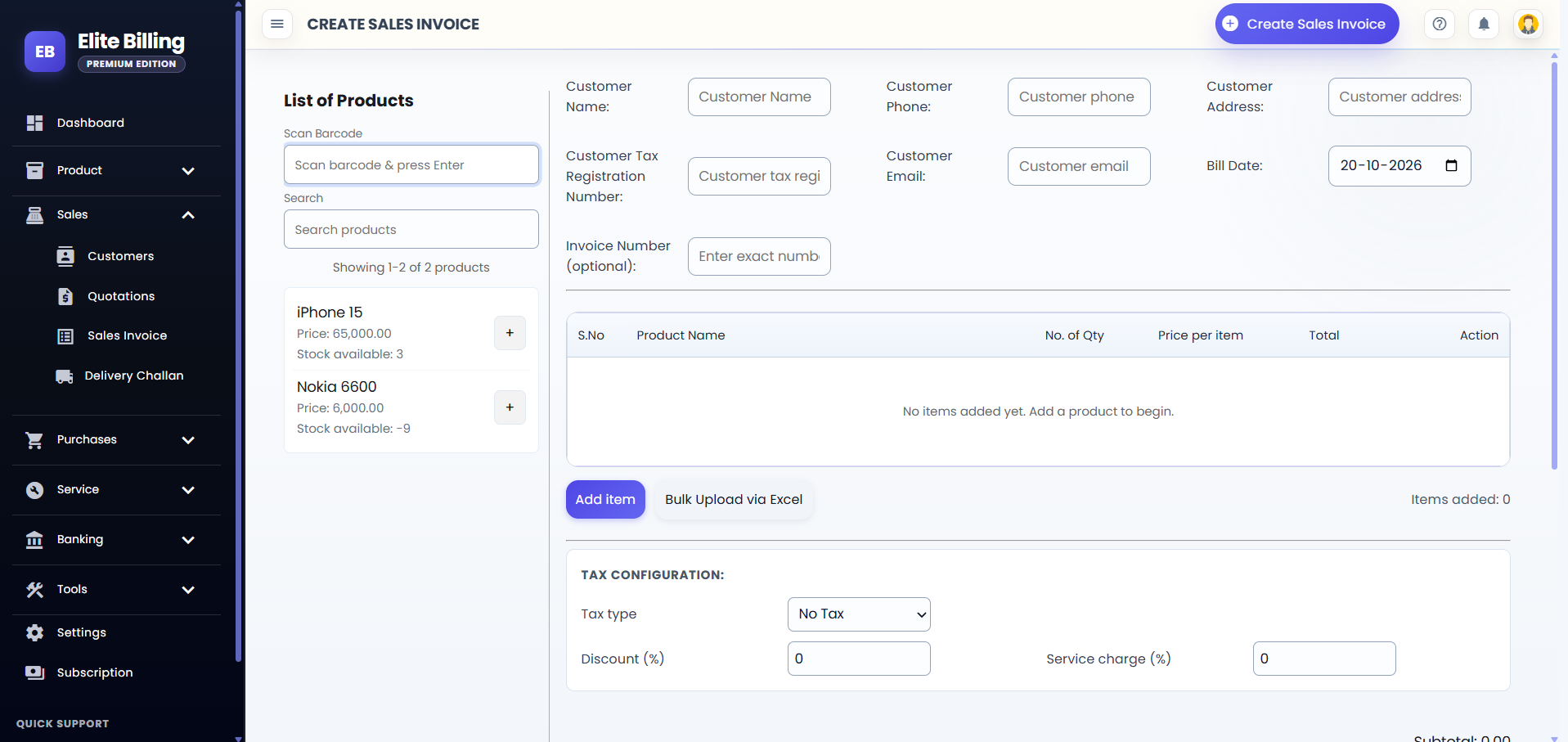
Elite Billing can find a saved product by barcode during invoice creation. Scan the code, confirm the product and continue billing. This reduces repeated typing and helps busy counters select the intended item quickly.
Barcode support is not unique to Elite Billing: Khata Billing also lists barcode-based invoice creation on its free plan. The practical difference is that Elite Billing combines barcode entry with unlimited invoices and five employee accounts. If fast retail checkout is central to your decision, review our guide to barcode inventory and billing software.
5. The workflow continues beyond the invoice
Elite Billing includes core records that small businesses use around a sale: quotations, purchase invoices, expenses, customer and supplier records, credit or due tracking, and reports. A quotation can be prepared first and converted after customer approval, avoiding duplicate entry. Read the quotation creation and conversion guide for the complete process.
The application also contains workflows for delivery challans and optional parcel labels, customer loyalty points, job cards and room bookings. These tools are useful only when they match your business, but they can reduce the need to maintain separate registers for delivery, service work, repeat-customer rewards or accommodation bookings.
What Elite Billing’s free plan does not include
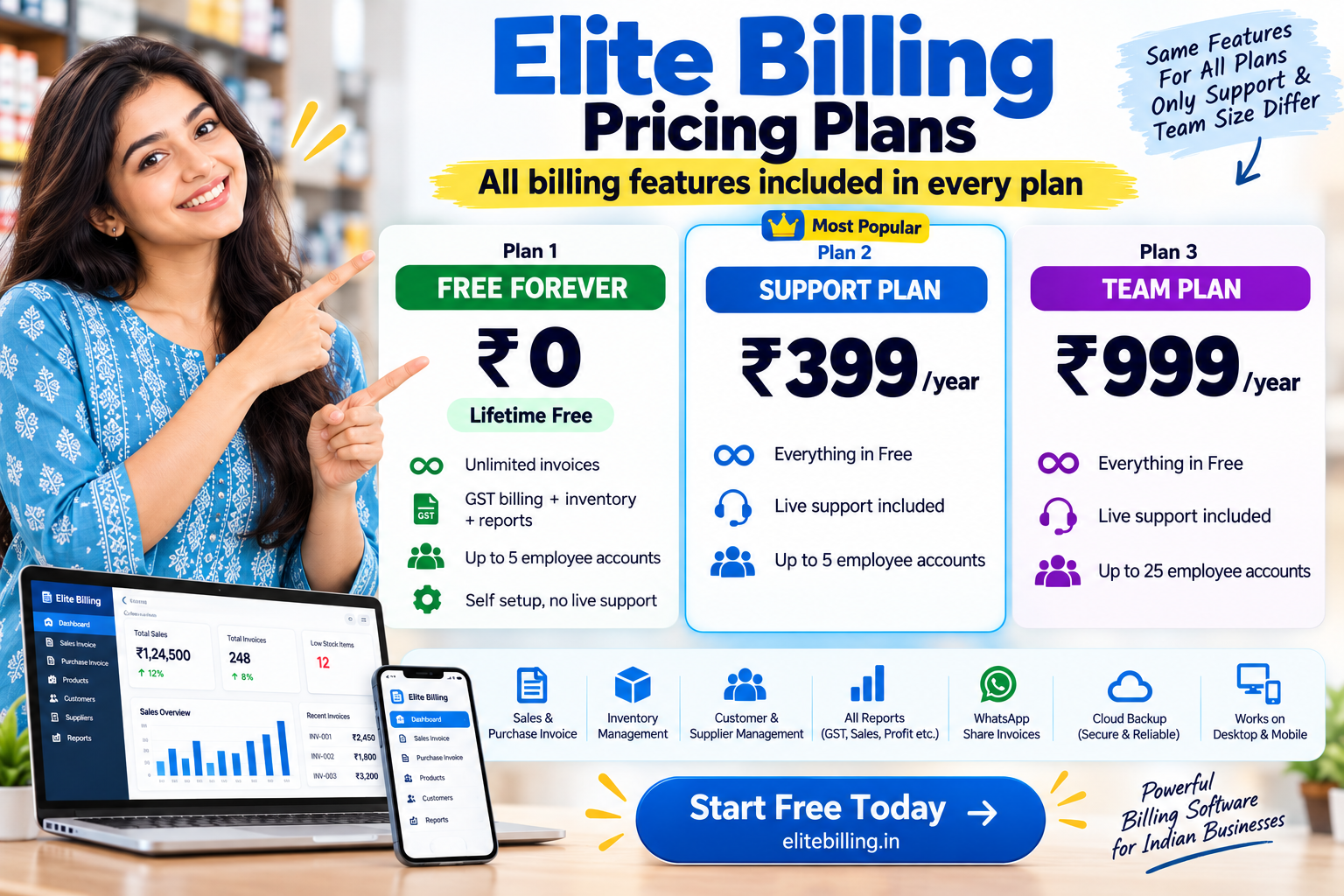
A trustworthy comparison should explain the trade-off. Elite Billing Plan 1 is designed for self-setup and does not include live support. Businesses that want live assistance can choose Plan 2 at ₹399 per year, with the same billing features and up to five employee accounts. Plan 3 is ₹999 per year and increases capacity to up to 25 employee accounts with live support.
These are annual plan prices published by Elite Billing at the time of this review. Check the current Elite Billing pricing page before upgrading.
When Zoho Books may be the better choice
Zoho Books is broader accounting software, not merely a bill generator. Its free India plan lists invoices, expenses, banking, reconciliation, GST reports, sales and purchase orders, a customer portal, item management and inventory tracking. A business that wants accounting depth and remains below the free-plan eligibility threshold may prefer that structure.
The trade-offs are important: the reviewed free plan applies to businesses with annual revenue up to ₹25 lakh, allows up to 1,000 invoices per year and includes one user plus one accountant. Basic stock tracking is available on the free plan, while capabilities such as warehouses, serial or batch tracking, and barcode generation or scanning are associated with higher plans. The earlier article brief said free users received no inventory; current published information shows that claim would be inaccurate, so this comparison does not repeat it.
When Khata Billing may be the better choice
Khata Billing’s free plan offers more than basic manual invoicing. It lists two POS screens, stock and party management, basic reports and barcode-based invoice creation. That can suit a small shop with a simple counter workflow and a modest number of GST invoices.
The main question is volume. The free plan lists a maximum of 10 GST invoices per day and 100 invoices in a 30-day period. If your business regularly crosses either threshold, include the paid plan cost in your decision instead of comparing only the starting price.
When GoGSTBill may be the better choice
GoGSTBill’s free plan lists sales and purchase invoices, customer and product records, basic inventory, payment receipts, mobile-app access, WhatsApp sharing, and phone and email support. For an owner who values assistance and stays within the allowance, it is a credible free option.
The reviewed free plan permits up to 3,000 documents per year and 25 items per document. Its Premium plan adds a larger document allowance and item limit along with advanced inventory, reports, staff accounts, barcode, quotations, delivery challans and other tools. Businesses with long invoices or growing transaction volume should calculate when those limits are likely to be reached.
How to choose without disrupting your business
Do not choose from the feature table alone. Test the jobs your team performs every day and use realistic sample data.
- Estimate volume: count bills on a normal day and during your busiest month. Compare that number with daily, monthly and annual limits.
- List the people who need access: include owners, cashiers, accountants and store employees, not only the person testing the software.
- Create real products: test GST or non-GST tax settings, units, selling prices, stock, and barcode entry if your shop uses it.
- Run a complete transaction: create a quotation or invoice, record payment, download the document and verify the result.
- Check the upgrade trigger: understand whether revenue, invoices, document lines, support or staff accounts will make you pay later.
- Review your first output: confirm business details, customer details, taxes, totals and terms before using the software for live billing.
Final verdict: the best free plan depends on your constraint
Elite Billing is the strongest option in this comparison for a small Indian business whose main priorities are unlimited invoicing, included inventory and access for up to five employees at ₹0. Its free plan is especially attractive for retailers, traders and service businesses that do not want invoice volume to become an upgrade trigger.
Choose Zoho Books when accounting depth matters most and its eligibility limits fit your business. Choose Khata Billing for a compact POS and barcode workflow within its invoice allowance. Choose GoGSTBill when its document limits are sufficient and free support is valuable. A fair choice is not about which product has the longest feature list; it is about which plan lets your business complete its everyday work with the fewest restrictions.
Frequently asked questions
Which is the best free billing software in India?
Elite Billing is a strong fit for businesses that need unlimited invoices, inventory and up to five employee accounts without a yearly software fee. Zoho Books may suit accounting-focused businesses, while Khata Billing and GoGSTBill can suit businesses that remain within their free usage limits.
Is Elite Billing really free?
Yes. Plan 1 has no yearly software fee. It includes core billing features, inventory, unlimited invoices and up to five employee accounts. It is a self-setup plan without live support.
Does Elite Billing limit invoice volume?
No invoice limit is listed for Elite Billing. Unlimited invoices are included across its three published plans.
Does Zoho Books include inventory on the free plan?
Yes. Zoho Books currently lists item management and inventory tracking on its India free plan. More advanced inventory functions are associated with higher plans.
Can free billing software support barcode billing?
Yes, depending on the product and plan. Elite Billing supports barcode product entry, and Khata Billing lists barcode-based invoice creation on its free plan. Zoho Books and GoGSTBill list relevant barcode capabilities on paid plans in the pricing information reviewed.
What happens when my team grows beyond five accounts?
Elite Billing Plan 3 supports up to 25 employee accounts and includes live support. Its published price at the time of this review is ₹999 per year.
Should I choose billing software only because it is free?
No. Check document limits, revenue eligibility, inventory depth, team access, support, exports and the time required to move your records. A free plan is valuable only if it fits the way your business operates.
Can pricing and free-plan limits change?
Yes. Software companies can revise features, usage limits and prices. This comparison records the published details reviewed on October 20, 2026; verify the current plan before making a long-term decision.
Start Using Elite Billing for Free
Create unlimited invoices, manage products and stock, and work with up to five employee accounts without a yearly software fee.
Create your free accountView the demoPlan 1 is self-setup and does not include live support.