Best Vyapar Alternative in India: Is Elite Billing Right for Your Business?
If you are searching for the best Vyapar alternative in India, start by matching the software to the work your business does every day. Elite Billing is worth considering when you mainly need GST invoicing, stock tracking, purchases, customer dues and a lifetime-free plan. Vyapar may be a better fit if your workflow depends on its offline billing, accounting reports, barcode tools or multi-godown inventory. Both products have no-cost entry options, so compare the exact plan and devices you will use.
This comparison is for Indian retailers, traders, wholesalers and service businesses. It uses product and pricing information published by the vendors and reviewed on October 8, 2026. It is not a hands-on performance test, and feature availability can vary by plan, platform and configuration.

Try Elite Billing Plan 1 at ₹0
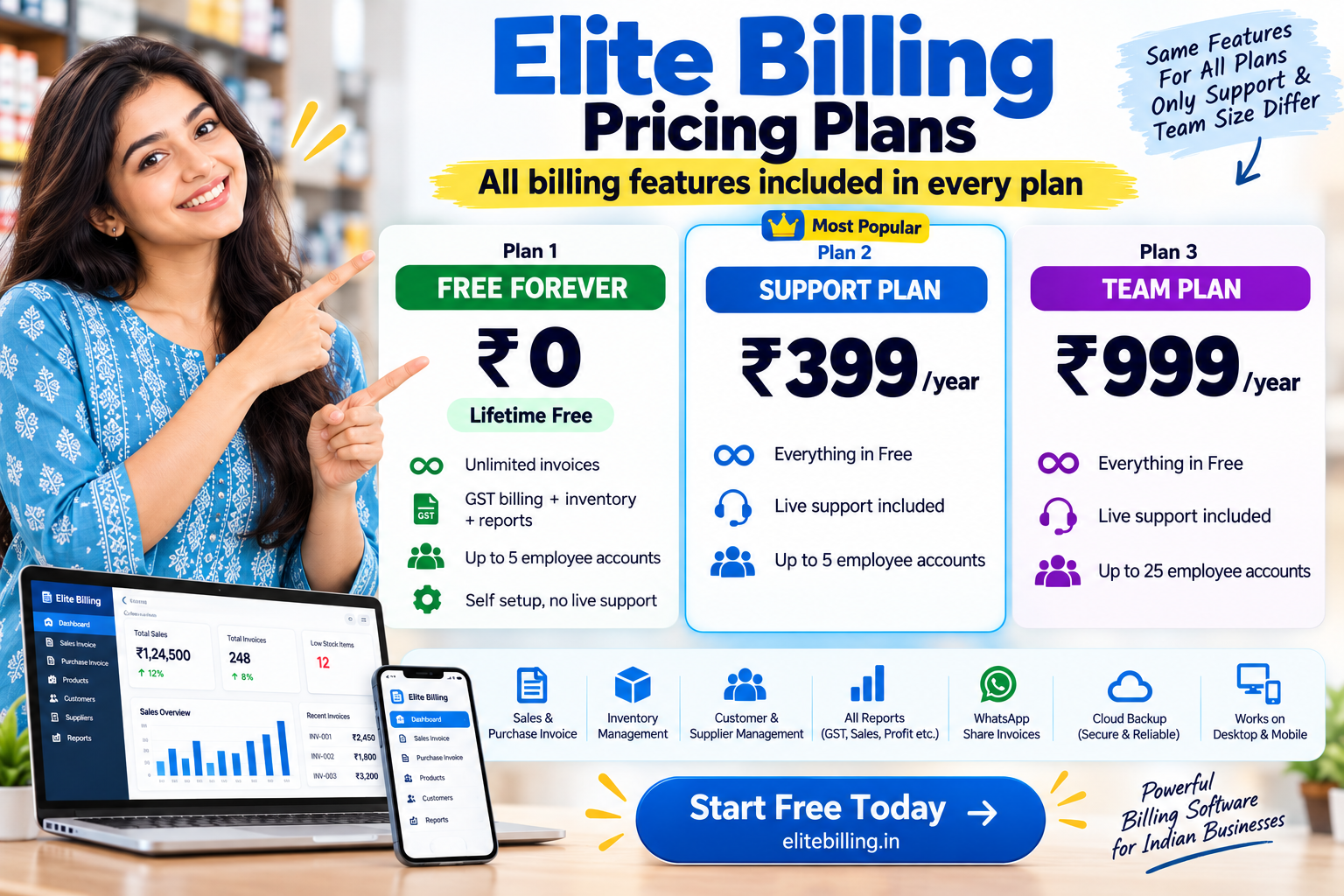
Plan 1 includes GST billing, inventory and unlimited invoices for up to five employee accounts. It is self-setup; live support is available on optional paid plans.
Start Using Elite Billing for Free Compare current plan detailsQuick comparison: Elite Billing vs Vyapar
There is no single right answer for every shop. Elite Billing centres on billing and daily stock workflows with a transparent free-plan path. Vyapar publishes a broader set of accounting and inventory capabilities, including offline use. Review the feature mix below against your own requirements and confirm current terms with each provider.
| What to compare | Elite Billing | Vyapar |
|---|---|---|
| Free and paid plans | Plan 1 is listed as lifetime free, with unlimited invoices and up to 5 employee accounts. Plan 2 is ₹399/year for live support; Plan 3 is ₹999/year for live support and up to 25 employee accounts. | Vyapar lists a free mobile option alongside trial and paid plans for other device and feature combinations. Compare the current plan for your intended platform before budgeting. |
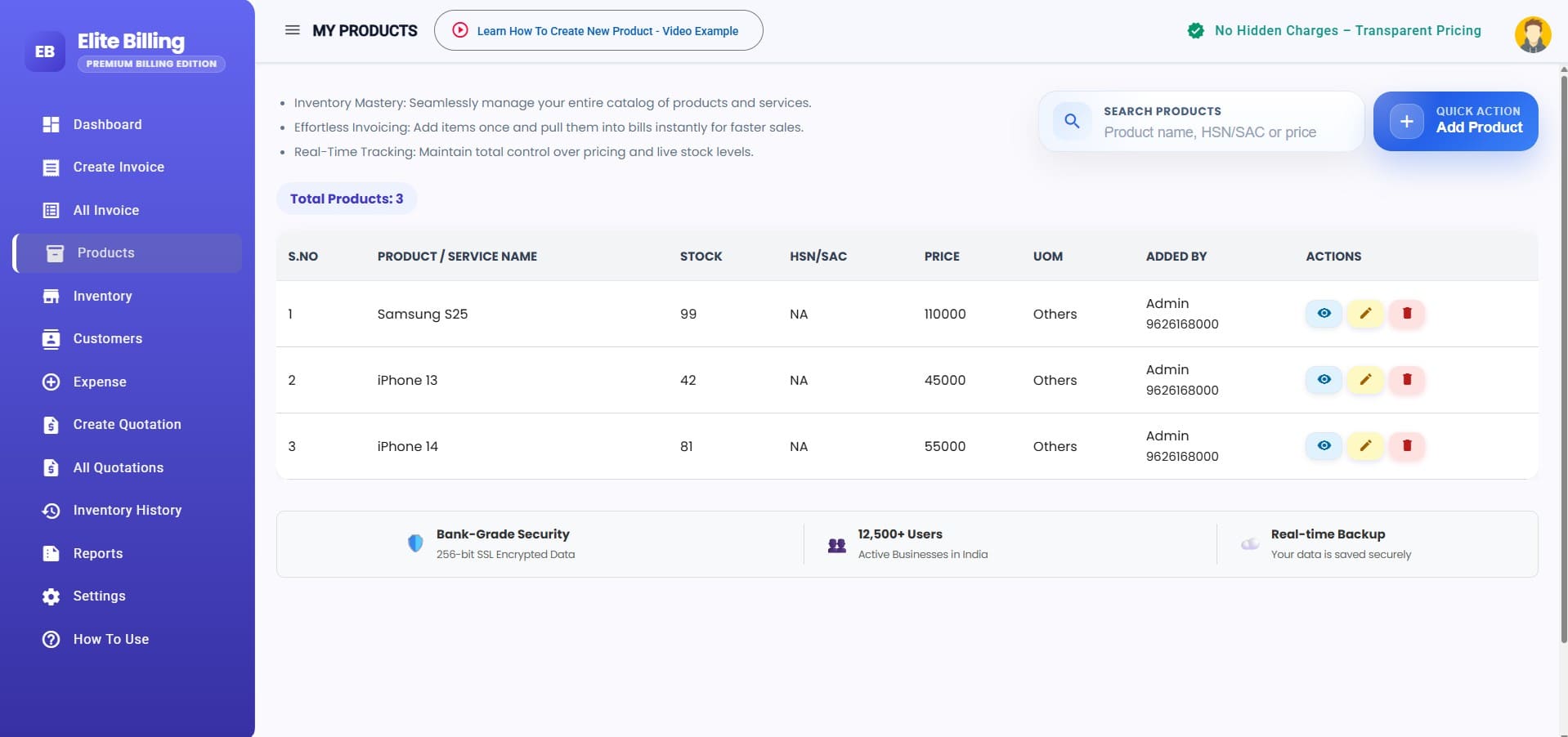
| Billing and stock | GST invoices, products, stock tracking, purchases, expenses, customer and supplier records, quotations and reports. | GST billing, sales and purchases, inventory, low-stock alerts and additional stock workflows listed across its plans. |
| Accounting | Billing-focused business records, expense tracking, customer dues and GSTR summary exports. | Vyapar also promotes ledgers, cash-flow and balance-sheet reports, bank reconciliation and other accounting workflows. |
| Offline work | Cloud-based access; confirm that an internet-connected workflow suits your counter. | Vyapar advertises offline billing and inventory use on supported desktop and mobile products, with sync options depending on setup. |
| Advanced inventory | Product and stock tracking for everyday sales and purchase workflows. Check any batch, expiry or multi-location requirement in the demo. | Vyapar lists options such as barcode tools, multiple godowns and batch or expiry tracking; verify which plan supports your use case. |
| A likely fit | Small businesses prioritising billing, stock and customer balances with a zero software fee. | Businesses that need Vyapar's offline, accounting, barcode or more advanced inventory workflows. |
For a checklist that applies across providers, see our guide to choosing billing software in India. Feature names above reflect vendor-published descriptions; confirm plan-level availability and test the workflows that matter to your business.
What Vyapar does well
Vyapar is an established small-business product with more than billing on its feature list. Its official pages describe GST invoices, purchase and sales records, expenses, accounting reports, payment reminders and inventory tools. Businesses that want those functions together may value the breadth, especially if their team already knows the software.
- Offline operations: Vyapar says supported desktop and mobile products can continue billing and managing stock without an internet connection, then sync when connectivity returns.
- Accounting options: Its accounting pages list ledgers, cash-flow and profit-and-loss reporting, balance sheets, GST reports and bank reconciliation.
- Inventory depth: Published inventory features include low-stock alerts, multiple godowns, barcode workflows and batch or expiry tracking. Confirm which edition and plan include the exact tools you need.
- Device choice: Vyapar offers mobile and desktop products. If you need records shared across several devices, check the current sync and licence terms for your setup.
Those are meaningful strengths, not drawbacks. A business already using Vyapar's offline workflow, advanced stock controls or accounting reports should map those tasks before considering any alternative. Our guide to billing software with stock management can help you list the inventory steps to test.
How Vyapar pricing works
Vyapar's public pages show a free mobile option as well as trial and paid plans for other feature and device combinations. The pricing pages are organised by platform and plan, so a headline price alone may not tell you whether a particular setup includes desktop access, multi-device sync or a feature such as barcode billing. Check the live Vyapar plans and pricing page and confirm the exact device combination, renewal period, taxes and included features before purchase.
This distinction matters if a business starts on one device and later adds a desktop, another outlet or more staff. Compare the total cost of the specific arrangement you plan to use rather than assuming the free option and every paid feature are interchangeable.
Vyapar also publishes detailed feature information for inventory management and small-business accounting. These are useful places to verify whether your current workflow depends on functions beyond invoicing.
When to look for a Vyapar alternative
Searching for an alternative does not necessarily mean Vyapar is a poor product. It may mean your priorities have changed or that a simpler cost and workflow match would suit your business better. Consider comparing another system when:
- You want a clearly stated lifetime-free plan for your current invoice volume and team size.
- Your daily work mainly involves GST invoices, purchases, stock, customer dues and basic business reports.
- You are not using offline billing, bank reconciliation, batch or expiry controls, or multi-godown management.
- You want to check whether your staff can learn a different billing workflow without disrupting the counter.
If barcode checkout or credit tracking is part of the decision, compare those tasks with the examples in our guide to barcode billing, inventory and credit tracking. Do not choose based only on a feature list: test the screens staff will use during a real sale, purchase and return.
What Elite Billing's free plan includes
Elite Billing's current pricing page lists Plan 1 at ₹0 for lifetime use. It includes unlimited invoices and up to five employee accounts, along with GST billing, inventory, purchases, expenses, customer and supplier records, quotations, reports and GSTR summary exports. Plan 1 is self-setup and does not include live support.
If you want live support, Plan 2 is listed at ₹399 per year and keeps the limit at five employee accounts. Plan 3 is listed at ₹999 per year and increases the limit to 25 employee accounts, with live support. Read the current Elite Billing plan terms before signing up, since features and prices can change.
A practical example: compare one sale from start to finish
Choose a product you sell regularly and test the same sequence in both systems: find the item, create a GST invoice, share or print it, record payment, then check whether stock and the customer's balance updated as expected. Next, enter a purchase for that item and review stock, supplier records and the reports your accountant uses.
For Elite Billing, also test the five-account limit in Plan 1 and decide whether self-setup is comfortable for your team. For Vyapar, check whether the plan you intend to use includes your required devices, offline operation, staff access and advanced stock functions. If you need more users, see our guide to multi-user billing software and compare the number of accounts and permissions in each product.
Before moving from Vyapar
Do not switch your live business data based only on a product page. Make a small migration checklist first:
- Export or record your item list, tax rates, customer and supplier details, opening stock and outstanding balances.
- Ask whether the destination accepts those records in a usable format. Do not assume that every field imports automatically.
- Create sample invoices for your common GST cases, discounts, returns and payment methods.
- Compare stock counts and customer balances with your existing records after entering sample data.
- Review reports, user permissions, backup and support options, then train staff before choosing a cutover date.
Keep your source records available until the new workflow has been checked. For a more complete transition plan, read our billing migration guide.
Frequently asked questions
Is Vyapar free to use?
Vyapar's official pages list a free mobile option alongside trial and paid plans for other device and feature combinations. Confirm the current plan terms for your platform and required functions on its official pricing page.
What is the best Vyapar alternative in India?
The best alternative depends on what you use today. Elite Billing is worth evaluating if your priority is GST invoicing, stock and customer records with a lifetime-free plan. If your work relies on offline billing, accounting reports, barcode flows or advanced inventory, verify that the alternative supports those exact tasks before switching.
Does Elite Billing have a free plan?
Yes. Elite Billing Plan 1 is listed as lifetime free, with unlimited invoices and up to five employee accounts. It is self-setup; live support is available on optional paid plans.
Can Elite Billing work without an internet connection?
Elite Billing is offered as a cloud-based workspace. If your counter must keep billing during internet outages, compare this requirement with Vyapar's published offline workflows and test both products before making a decision.
What should I check before switching from Vyapar?
Check export and import options for products, customer and supplier records, opening stock and outstanding balances. Also test GST invoices, returns, reports, user permissions, backups and support before moving all business data.
Conclusion: choose the workflow that fits
Vyapar offers a broad set of billing, accounting and inventory options, including offline workflows and advanced stock features. Elite Billing may suit a small business that wants GST invoicing, stock and customer records with a lifetime-free plan and a clear optional support path. Review current plan terms, test a real counter workflow and move only after your records reconcile.
To compare more than Vyapar alone, read our Zoho vs Vyapar vs MyBillBook vs Elite Billing guide before choosing.
Try Elite Billing for your business
Explore the free plan and test whether its billing and stock workflow fits your team.
Start Using Elite Billing for Free View the product demo